Maintenance
Maintenance that knows the building.
Before anyone knocks.
Work orders, preventive maintenance, inspections and unit turns in one place. Every request arrives with the unit’s history, the device behind the problem and access for the visit, and it lands in your property management system as if your team had typed it there.
Part of Della OS. At the desk in Della Connect,
in the field with Della Connect Mobile.
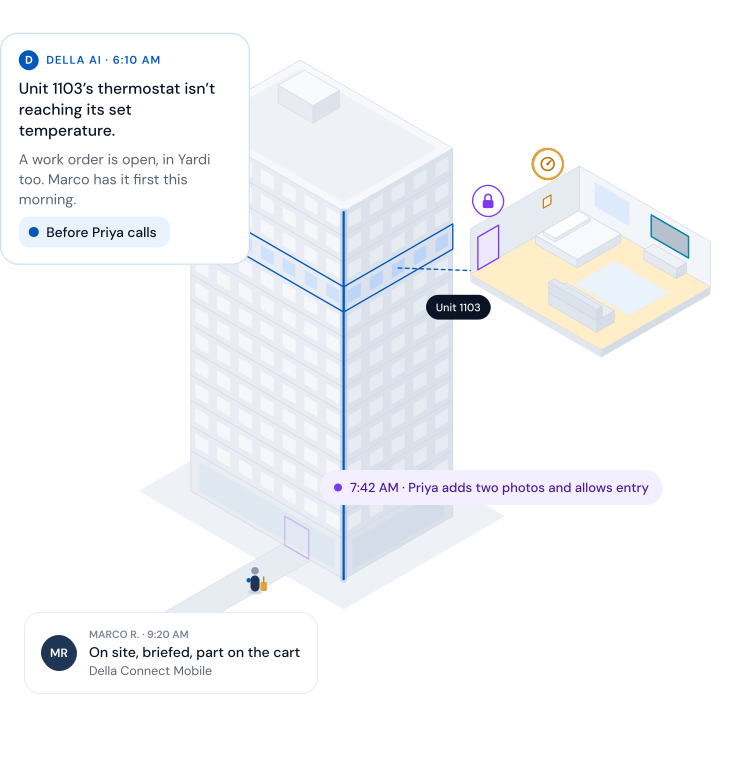
Illustrative morning at Cedar Quay, a demonstration building.
The same problem, twice
Turned up to 76. Still cold.
Two very different mornings.
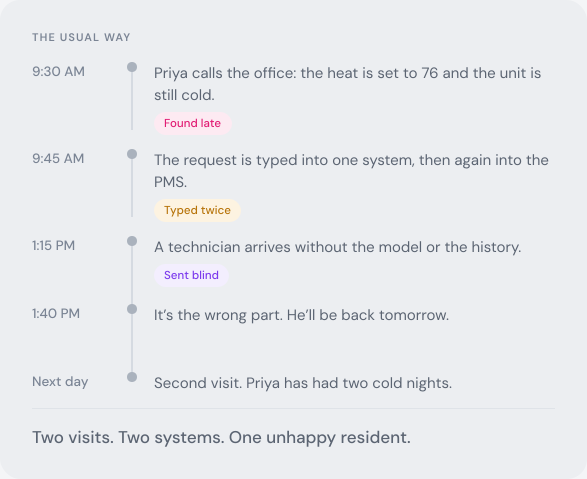
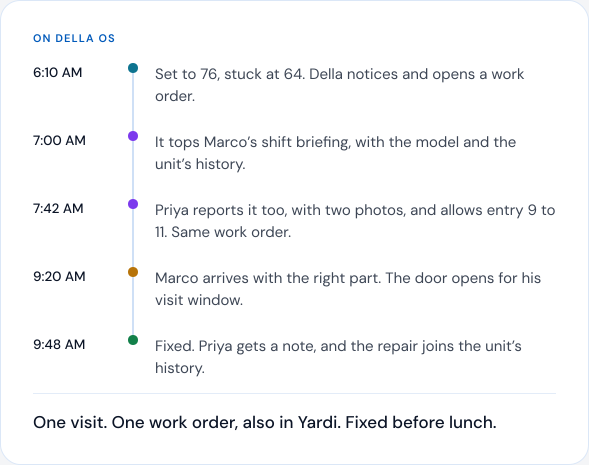
Unit 1103 is set to 76 and never warms up. Here’s the same problem run the usual way, and run on Della OS.
Illustrative example with a demonstration building and fictional names.
One work order
Everything the building knew,
in one work order.
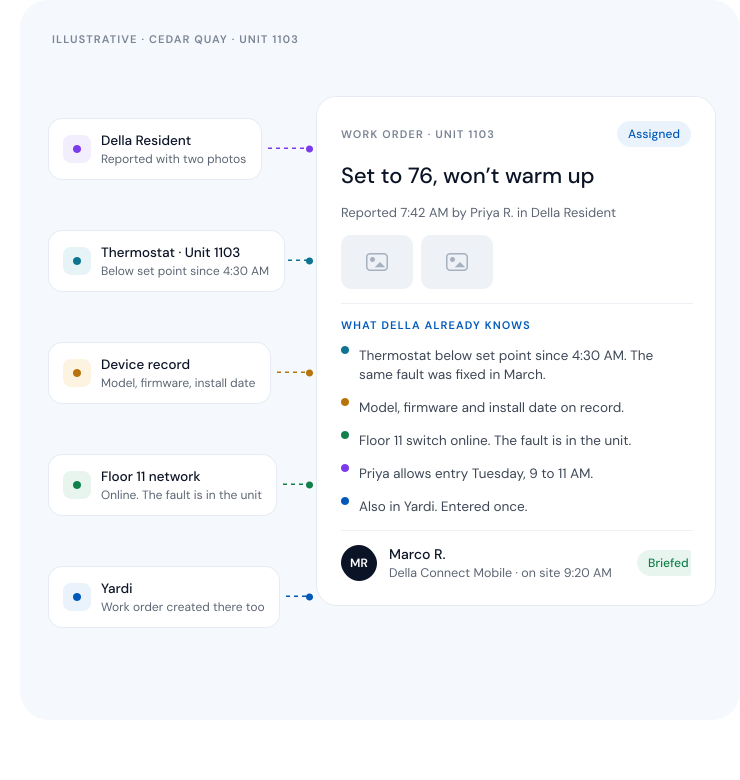
Della OS pulls the request, the device, its history, the network and access into the work order, then writes it to your PMS once.
From the resident
Photos, a description and permission to enter, from Della Resident.
From the device
What it detected, when it started and what happened last time.
From the device record
Model, firmware and install date, so the right part goes on the cart.
From the network
Whether the real fault sits upstream, so the right person goes.
To your PMS
The same work order, written once, as if your team typed it.
Illustrative work order with a demonstration building.
For technicians
The whole job,
in their pocket.
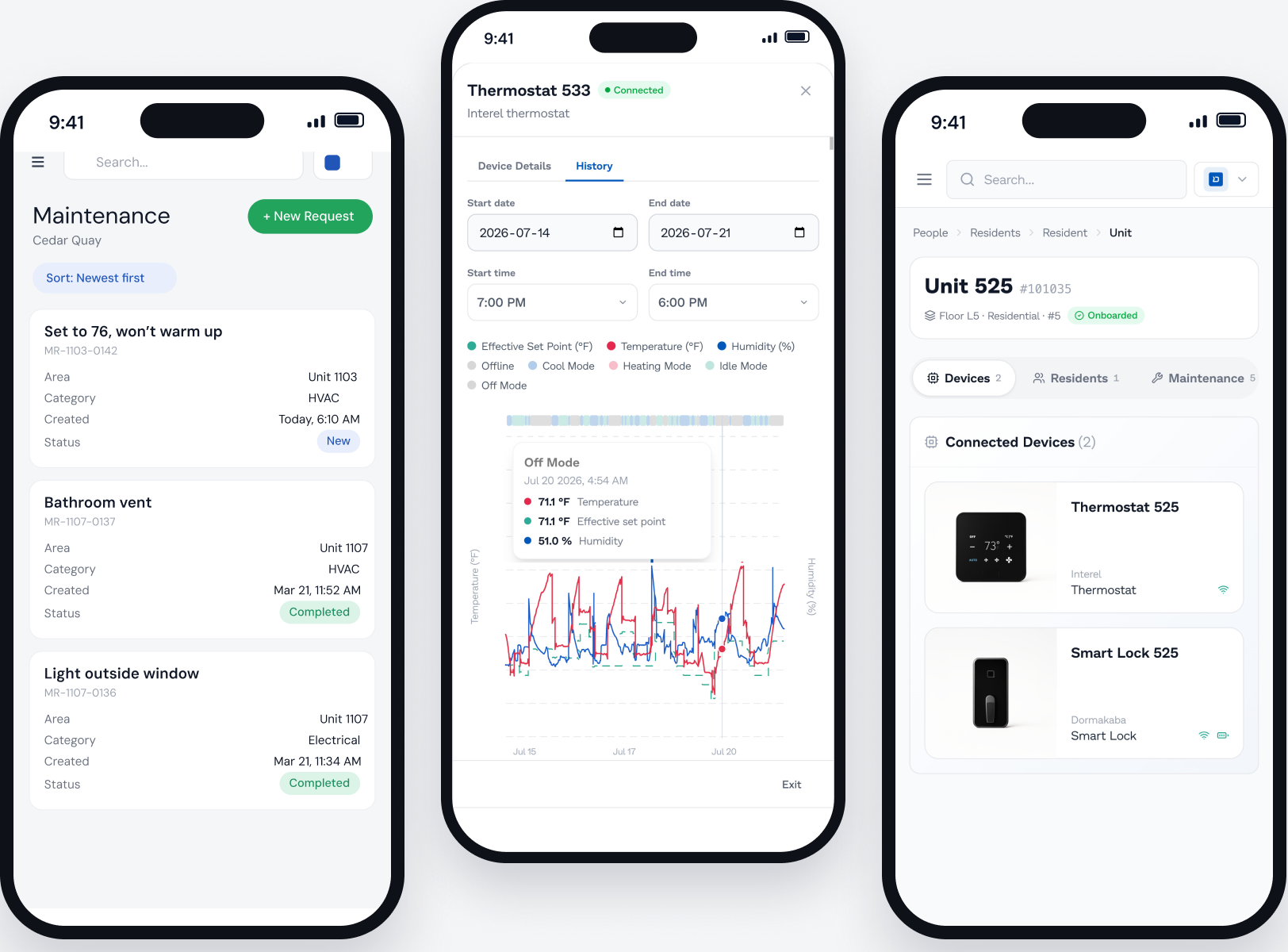
Della Connect Mobile gives technicians the day’s work, the unit and its devices, and the history behind every repair, wherever they are in the building.
Today’s work, by priority
Requests, preventive jobs and turns in one list, the most urgent first.
The unit and its devices
Open a unit to see every connected device, its status and what it has been doing.
Photos, notes and voice
Capture the work as it happens, or speak a new work order.
Hand off mid shift
Pass a job, with access for the visit, to another approved technician.
Find the part
Look up the replacement with a supply partner before a second trip.
Real Della Connect Mobile screens with demonstration names. The maintenance list is redrawn from a real screen.
Building health
Problems found
before residents call.
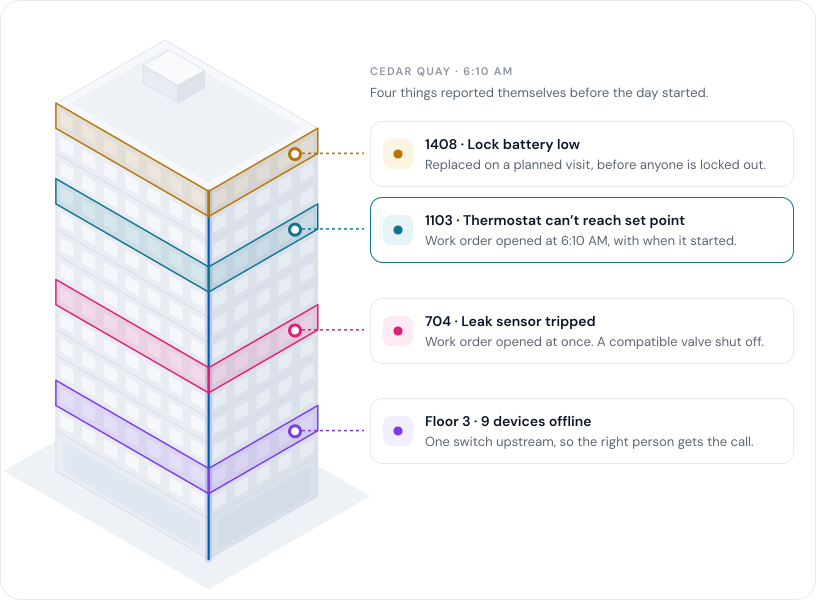
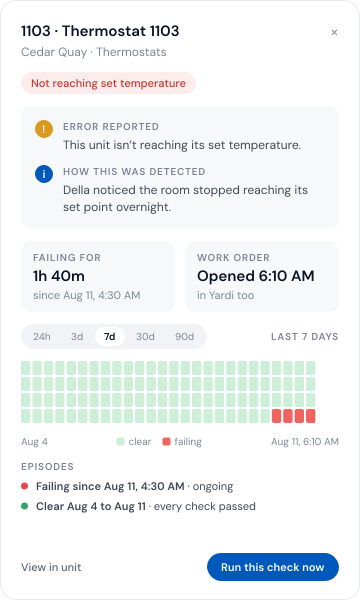
With supported devices, the building reports its own problems. The work order opens itself, with what was detected and for how long.
Illustrative building map. The device check is redrawn from a real Della Connect screen, with demonstration names and dates. Automatic work orders depend on the device and the integration.
Preventive maintenance
Recurring work, on schedule.
No spreadsheet required.
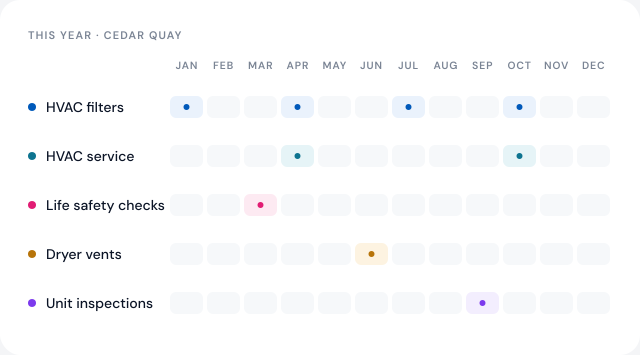
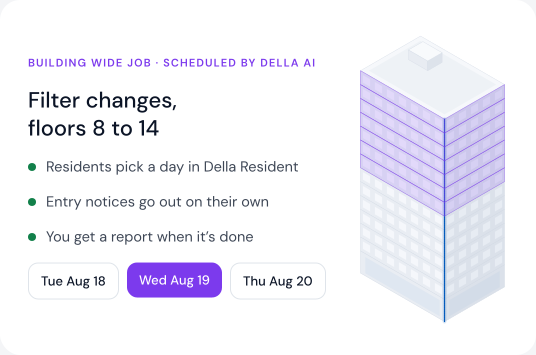
Set filter changes, life safety checks and annual inspections once. Della OS opens the work orders on schedule, assigns them and tracks them to done.
Illustrative schedule. Each property sets its own recurring work.
Turns and inspections
When the lease ends,
the turn begins.
A move out recorded in your PMS starts the turn through Occupancy Sync. The inspection, the work orders it creates and the make ready checklist follow on their own.
In Yardi · 9:02 AM
Move out
Unit 1207 · lease ends Aug 31
›
Move out inspection
4 findings, with photos
Wall, carpet, blinds and a smoke detector
›
Work orders
Created from findings
PaintCarpetBlindsSmoke detector
›
Make ready
Checklist, 12 of 14
›
Ready
Unit 1207 is ready
Back to vacant settings until the next move in
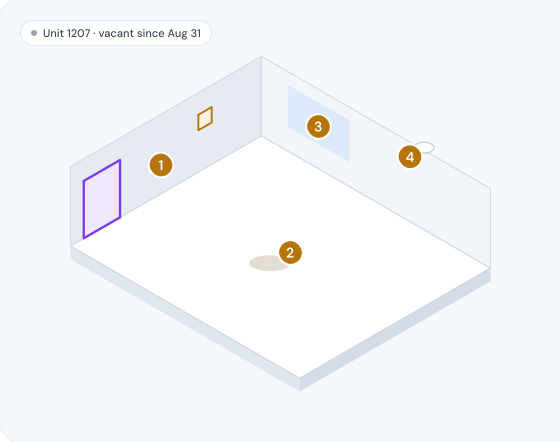
Move out inspection · Sep 1
Four findings, four work orders.
Each finding is pinned, photographed and turned into a work order, ready for the make ready checklist.
1
Wall · scuffs by the entry
2 photos
2
Carpet · stain in the living area
3 photos
3
Blinds · two broken slats
1 photo
4
Smoke detector · past its replace date
1 photo
Annual and fire inspections
Run from unit status, so occupied, vacant and model units are each handled the right way.
Buying a building?
Due diligence inspections run in Della too. Where Della OS is already installed, a full report of systems and devices is ready right away.
Unit history
Every unit keeps its story.
Long after residents move on.
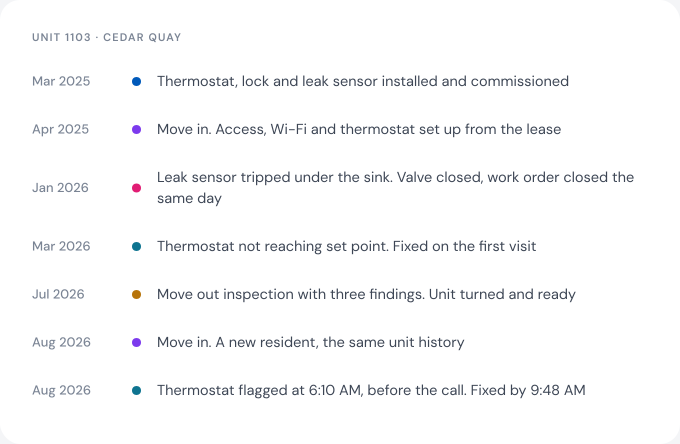
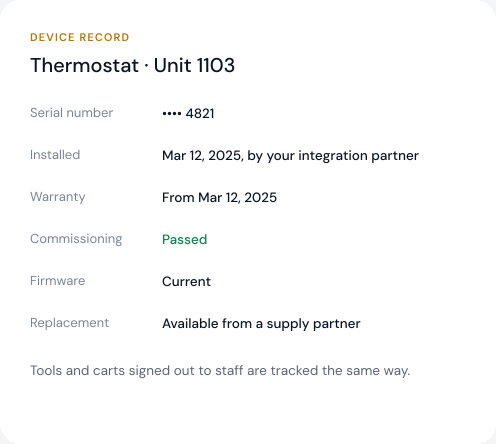
Repairs, inspections, device checks and replacements stay with the unit, not the resident. Every connected device has a record from the day it was installed.
Illustrative unit history and device record with a demonstration building.
Works with your PMS
One work order.
Entered once.
A work order created in Della appears in Yardi, Entrata, RealPage, AppFolio or ResMan exactly as if someone had typed it there. Your PMS stays the system of record for the business. Della runs the building.
Works withYardiEntrataRealPageAppFolioResMan
Della AI
AI that knows what broke,
where and when.
Della AI works inside your team’s permissions and the building’s real data, so it can do more than answer questions.
Spots it first
Finds units missing their set point and opens the work order.
Voice to work order
Turns a spoken request into a complete work order.
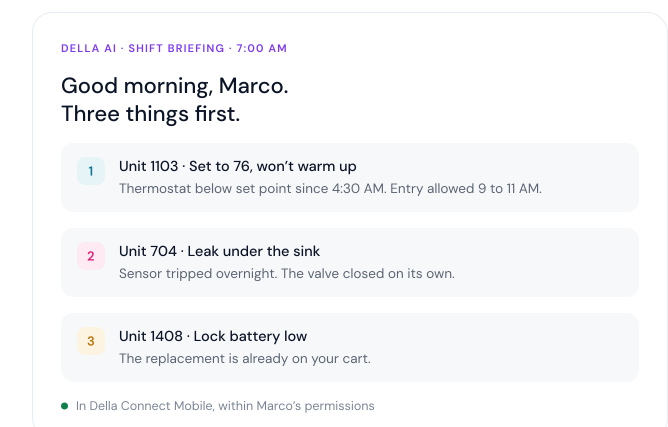
Starts every shift
A briefing of what needs attention first, where, and who has it.
Books building wide jobs
Lines up visits with residents and sends the entry notices.
Watches the trend
Shows when slow repairs start to affect how residents feel.
Illustrative briefing with a demonstration building. What Della AI can do depends on the property’s setup and each person’s role.
For every role
One maintenance picture.
Seen four ways.
Everyone works from the same work orders and unit history. Each person sees what their role allows.
Technicians
Della Connect MobileToday’s work, the unit’s history and access for the visit.
Maintenance supervisors
Della ConnectAssign work, set preventive schedules, and run inspections and turns.
Property managers
Della ConnectKeep residents updated and the PMS in step, without retyping.
Owners and asset managers
Della PortfolioMaintenance across every building, and where slow repairs are costing goodwill.
Questions
Questions about
maintenance.
What maintenance software does Della OS include?
−
Maintenance in Della OS covers resident requests, work orders, preventive maintenance, inspections and unit turns. Staff run it in Della Connect at the desk and Della Connect Mobile in the field. Residents report and follow requests in Della Resident.
Does it work with our property management system?
+
Yes. Della OS works with Yardi, Entrata, RealPage, AppFolio and ResMan, with more PMS integrations coming in 2027. A work order created in Della appears in your PMS exactly as if someone had typed it there, so your PMS stays the system of record for the business.
Is there an app for technicians?
+
Yes. Della Connect Mobile gives technicians the day’s work by priority, each unit and its connected devices, and the history behind every repair. They can add photos, notes and voice work orders, and they get access for the visit.
Does Della OS support preventive maintenance?
+
Yes. Set recurring work such as filter changes, life safety checks and annual inspections once. Della OS opens the work orders on schedule, assigns them and tracks them to done. For building wide jobs, residents can pick a day in Della Resident and entry notices go out on their own.
Can the building open its own work orders?
+
Yes, with supported devices. A thermostat that can’t reach its set point, a leak sensor that trips, a lock battery running low or a device that goes offline opens a work order with what was detected and when it started. Automatic work orders depend on the device and the integration.
Do we need smart devices to use it?
+
No. Requests, work orders, preventive maintenance, inspections, turns and unit history all work without new hardware. Connected devices add automatic work orders and device history.
How does Della handle unit turns?
+
A move out recorded in your PMS starts the turn through Occupancy Sync. The move out inspection records findings with photos, each finding becomes a work order, and the make ready checklist tracks the unit until it’s ready. The unit then goes back to vacant settings until the next move in.
Can condominiums use it for common areas only?
+
Yes. In condominiums, owners usually arrange their own unit repairs, so maintenance requests can be switched off or kept on for common area issues only.
Maintenance
See maintenance run
on your own building.
Book a walkthrough with your PMS and the systems you already have.