Built to keep running

If the software goes quiet, the building doesn’t.
The logic lives in the devices.

Della OS connects the systems your building already runs on. Locks, access control, thermostats and Wi-Fi keep their own logic. If Della, its AI or a connection is ever unavailable, doors still open, homes stay comfortable and residents get through their day. When Della is back, it catches up.

Your PMS runs the business.
Della runs the building.

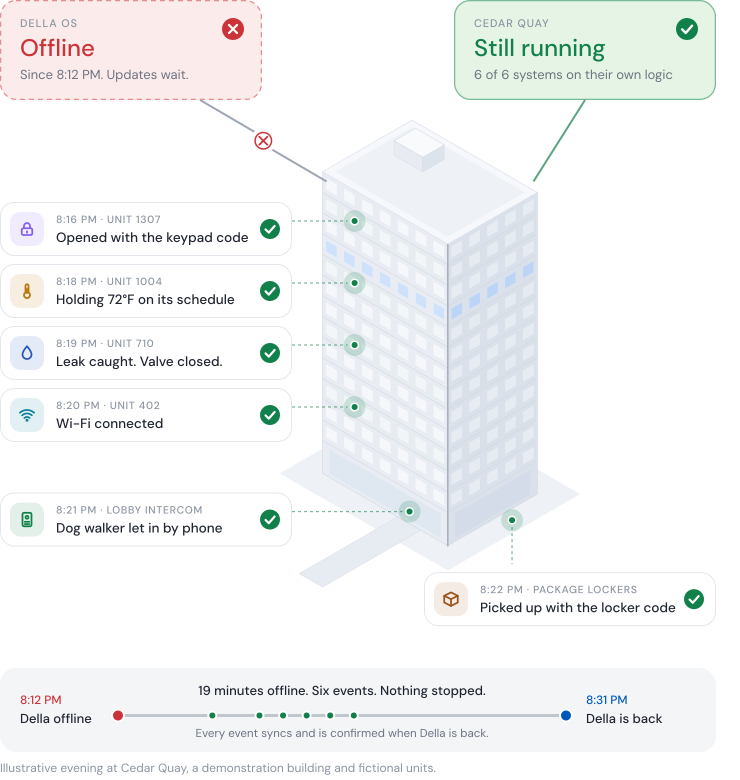
Illustration of the Cedar Quay apartment tower one evening while Della OS is offline from 8:12 PM. The building keeps running: a unit door opens with its keypad code, a thermostat holds 72°F on its schedule, a leak is caught and the valve closes, Wi-Fi connects, a dog walker is let in by phone and packages are picked up with the locker code. At 8:31 PM Della is back and catches up on all six events.

How Della is built

Driver assist,
not a car with no steering wheel.

A building before Della is a car that already drives: locks, access, thermostats and Wi-Fi all work on their own. Della adds the features that make the drive easy. Lose them for a while and you still get where you’re going. It’s just less convenient.

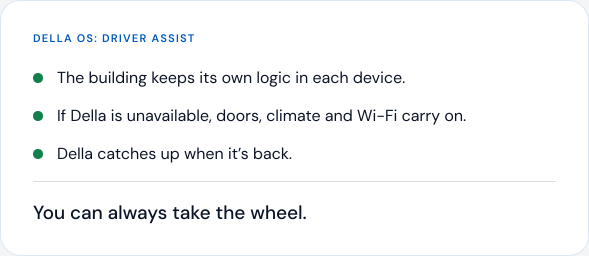
Della OS as driver assist: the building keeps its own logic in each device. If Della is unavailable, doors, climate and Wi-Fi carry on, and Della catches up when it’s back. You can always take the wheel.
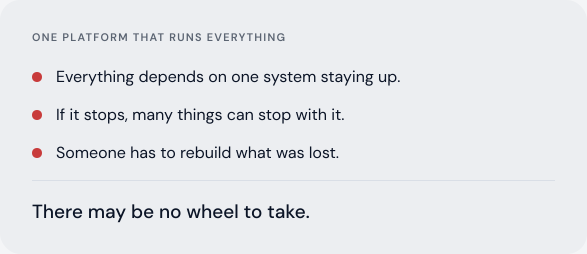
One platform that runs everything: everything depends on one system staying up. If it stops, many things can stop with it, and someone has to rebuild what was lost. There may be no wheel to take.

Connected should never mean dependent.

What keeps working

Every system keeps doing its job.
Only the updates wait.

Della connects to systems that already have their own software. Here’s what happens to each one if Della is unavailable.

Doors and access control

Codes, fobs and phone keys keep opening the doors they opened before. New credentials and changes wait until Della is back.

Unit locks

Residents’ keys keep working, and every lock has emergency codes built in for situations like this.

Intercom and video entry

Visitor calls ring in the intercom maker’s own app, or fall back to a phone call the resident answers to let the visitor in.

Package lockers

Residents confirm who they are at the locker, enter their unit number and collect their packages.

Climate

Thermostats keep following the schedule and settings they already had.

Leaks and water

Leak sensors still sound their alarm and shutoff valves still close. Alerts can come through the leak system’s own app.

Wi-Fi

Each resident’s private network keeps working on the keys it already has.

Resident app

Residents can still use their wallet key, fob or keypad code, and the app’s Bluetooth key if the app opens.

Maintenance

Your team can still see every work order. New requests can come by phone or the app, and Della records and confirms them when it’s back.

Move ins and move outs

Your team works the way buildings run today, and Della catches up automatically. A short outage may go unnoticed.

What keeps working depends on each system and how it’s set up. We’ll walk through your building’s systems with you.

Planned for

The AI, the PMS link or Della itself.
Here’s what happens in each case.

Three different things can be unavailable. None of them stops your building.

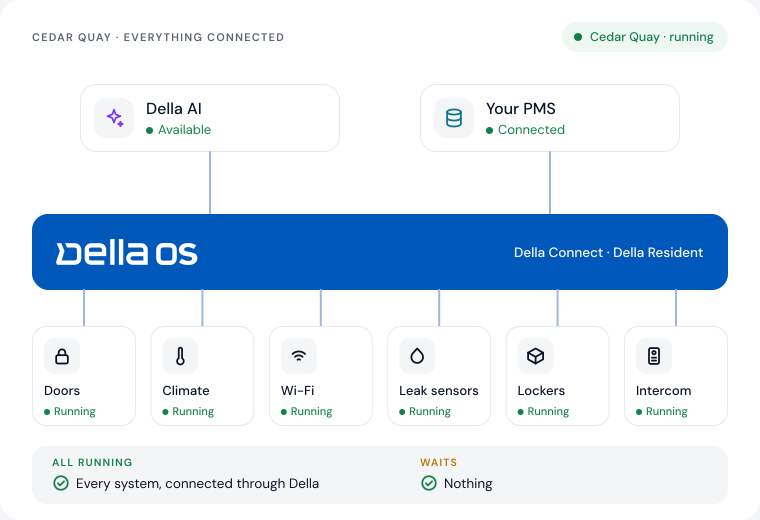
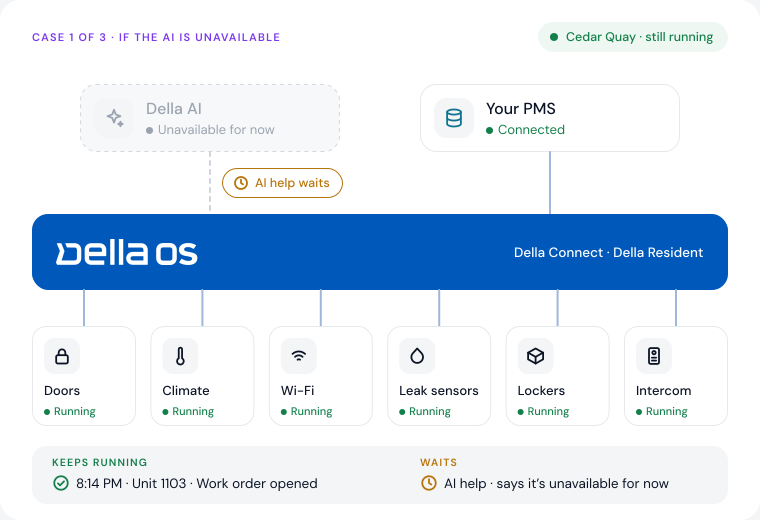
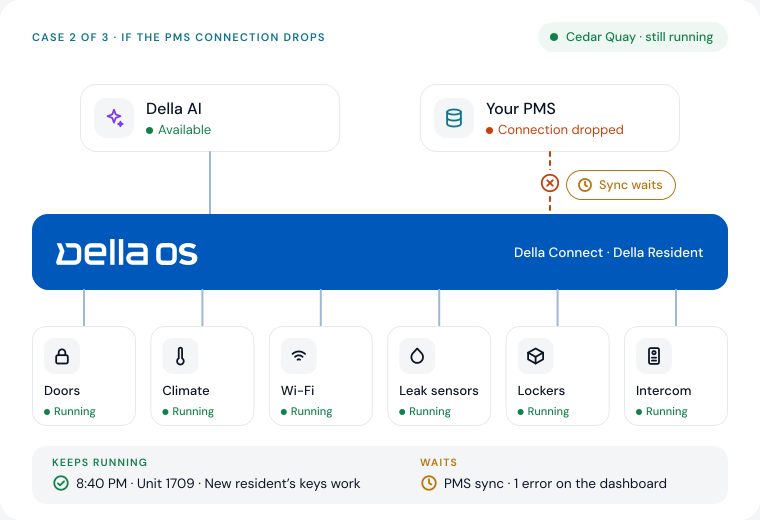
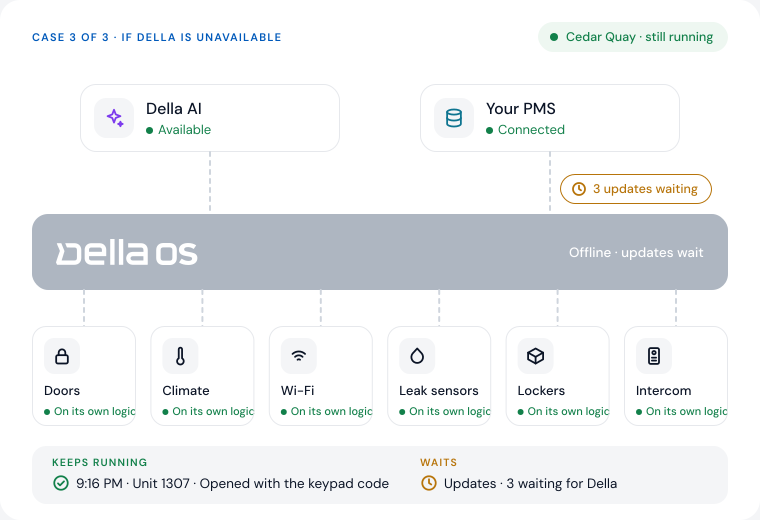
Cedar Quay with everything connected: Della AI and the PMS link to Della OS, and doors, climate, Wi-Fi, leak sensors, lockers and the intercom all running.Case 1: Della AI is unavailable for now. Every building system keeps running, a work order opens for Unit 1103, and AI help waits.Case 2: the PMS connection drops. Della keeps working from what it already knows, the new resident's keys work in Unit 1709, and PMS sync waits.Case 3: Della is offline. All six building systems keep running on their own logic, Unit 1307 opens with the keypad code, and three updates wait for Della.
Pause animation

If the AI is unavailable

Keeps running

Work orders, access, bookings and everything else in Della.

Waits

AI help, which says it’s unavailable for now.

If the PMS connection drops

Keeps running

Della, working from what it already knows.

Waits

PMS sync. Errors show on the dashboard and clear automatically, or wait for your team to review them.

If Della is unavailable

Keeps running

Every building system, on the logic in its devices. Your team works the way buildings run today.

Waits

Updates. Della catches up and confirms everything when it’s back.

Short outages often go unnoticed. Long ones fall back to how your building already works.

Don’t put all your eggs in one basket

Your PMS runs the business.
Della runs the building.

Your property management system holds the lease, the ledger and the resident record. Della OS runs what happens in the building: doors, devices, maintenance and the resident experience. Keeping the two separate is a choice, and it protects you.

Your PMS runs the business: the lease, the ledger and the resident record. Della OS runs the building: doors, devices, maintenance and the resident experience. The two are connected but kept separate.
Works withYardiEntrataRealPageAppFolioResMan

Switch either one.

Change your PMS and the building standard stays in place. Change hardware and the PMS never notices.

No single point of failure.

A problem in one system doesn’t stop the other. Your business keeps billing and your building keeps running.

Choose your own tools.

Keep the leasing and communication tools you like. Della works alongside them and gives them a building they can rely on.

Ownership

Your records belong to you.
We will never hold them hostage.

Owners own their data. That stays true whatever happens to the software around it.

Backed up to your PMS

Della backs up its records to your PMS and keeps its own alongside.

Download whenever you want

Work order history, device records and reports are always available, using reports built to your needs with Della AI.

Yours if you move on

If you ever move on, your data goes with you.

Questions

Questions about
uptime and control.

What happens if Della goes offline?

−

Your building keeps running. Locks, access control, thermostats, intercoms, lockers and Wi-Fi keep the logic they already have. Updates wait, and Della catches up and confirms everything when it’s back.

Can residents get locked out if Della is down?

+

Residents keep their wallet keys, fobs and keypad codes, and the app’s Bluetooth key works if the app opens. Each unit lock also has emergency codes built in.

What happens if Della AI is unavailable?

+

The assistant says that AI help is unavailable for now. Everything else in Della keeps running.

What if the connection to our PMS drops?

+

Della keeps working with what it already knows. Sync errors show on the dashboard, then clear automatically or wait for your team to review them.

Can we download our data, and what happens if we leave?

+

Yes. Della backs up its records to your PMS and keeps its own. Your team can download reports any time, and your data always stays yours.

Does Della replace our PMS?

+

No. Your PMS runs the business and Della runs the building. Keeping them separate means a change in one never forces a change in the other.

Built to keep running

See how your building keeps running,
system by system.

Book a walkthrough and we’ll go through your building’s systems with you.