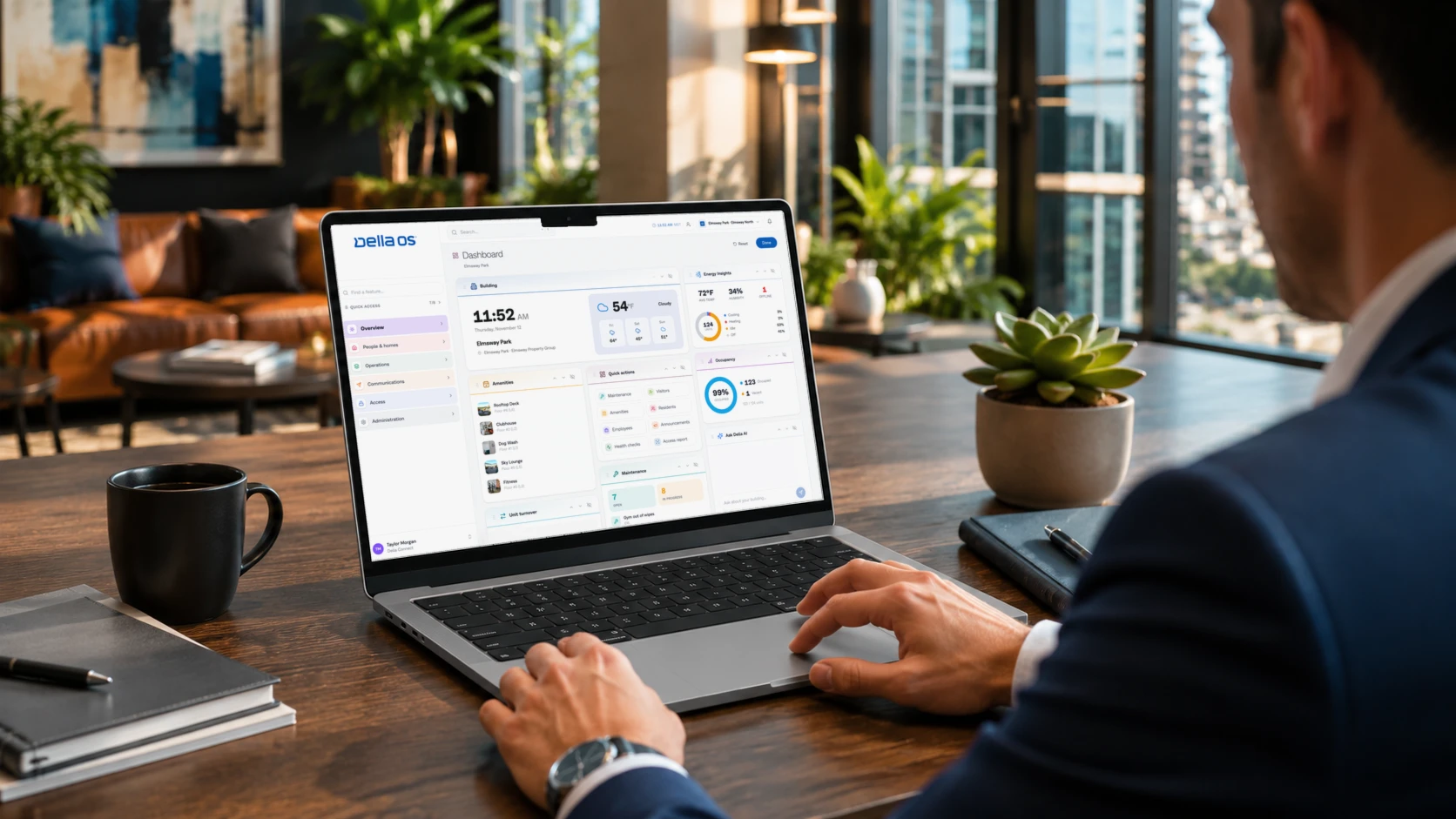
Della Connect | Property operations software
Run the property. With the whole picture.
Della Connect is the daily management interface inside Della OS. Bring resident information, maintenance, access, communications and connected building systems into one workspace, so your team can understand what needs attention and manage the work.
At the desk. Across the property. With Della Connect Mobile.
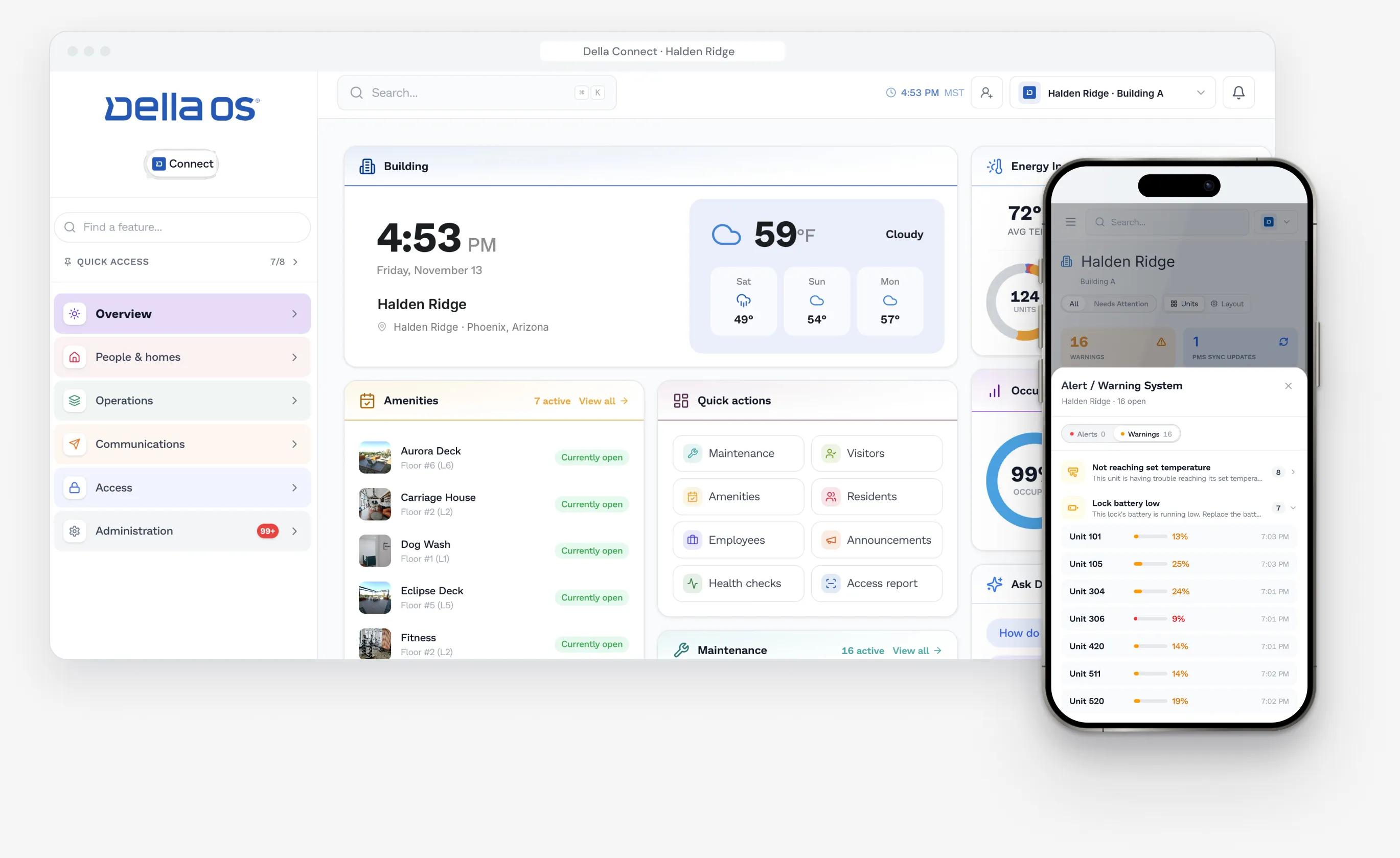
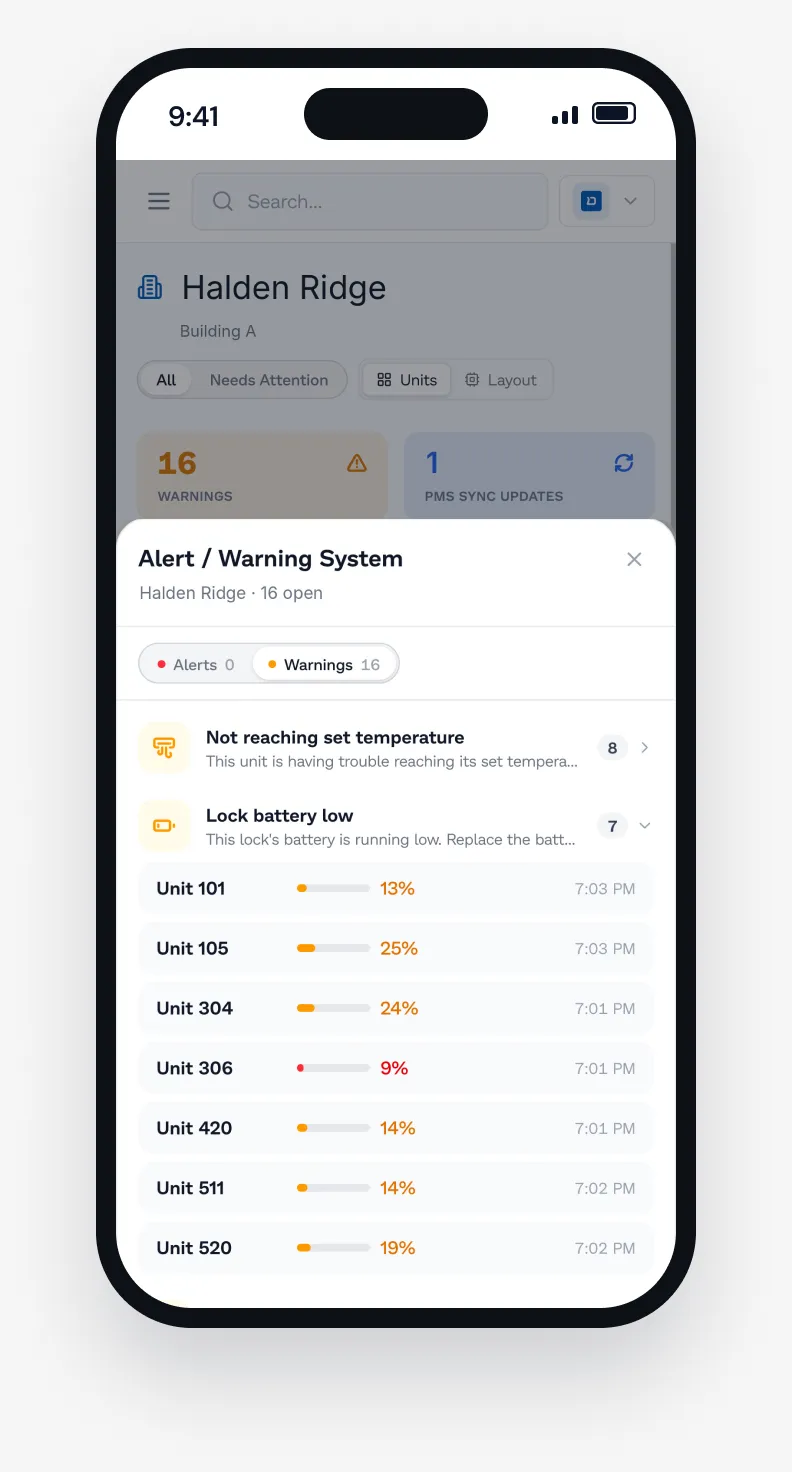
Real Della Connect screens, shown with a demonstration property name.
Della OS connects the building. Della Connect puts your team in control of the daily operation.
Built for the people who run the property every day.
The problem
Your team should run the property. They should not have to connect it themselves.
A resident record changes in one system. Access needs updating in another. A maintenance request arrives somewhere else.
Your team is left to make the pieces line up.
Della OS connects systems and workflows. Della Connect gives staff a shared workspace to manage the people, tasks and building information behind the daily operation.
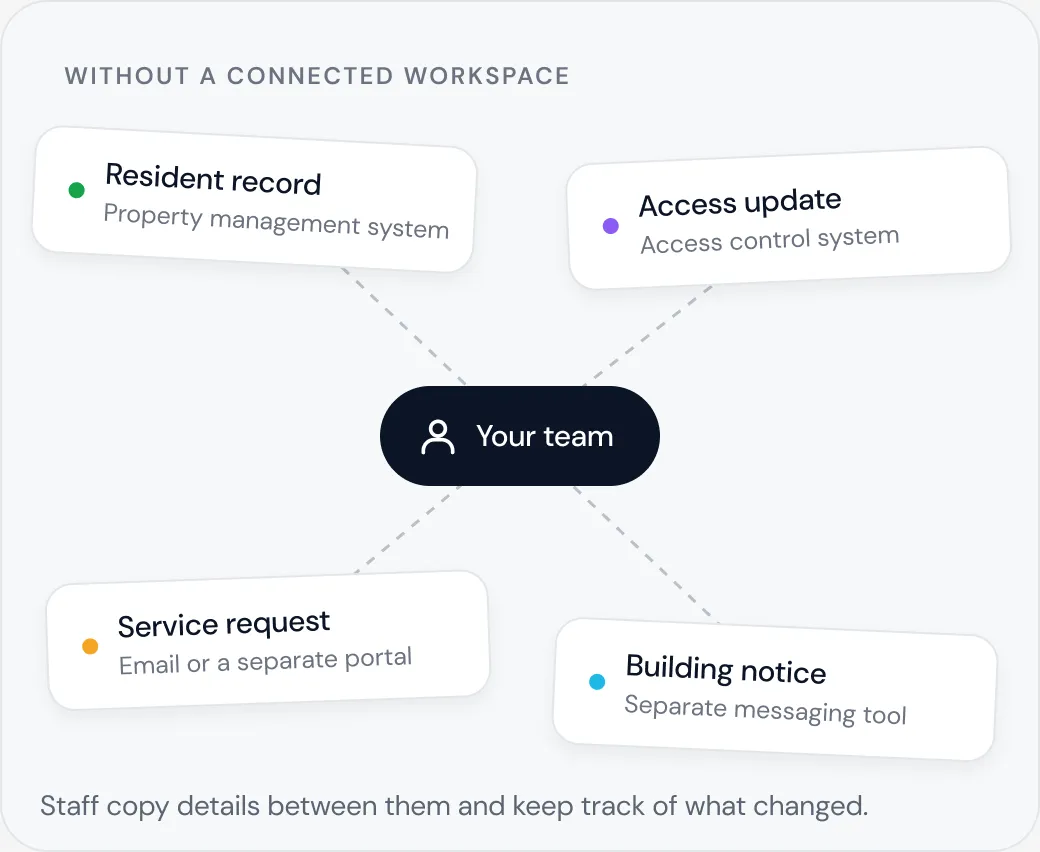
→
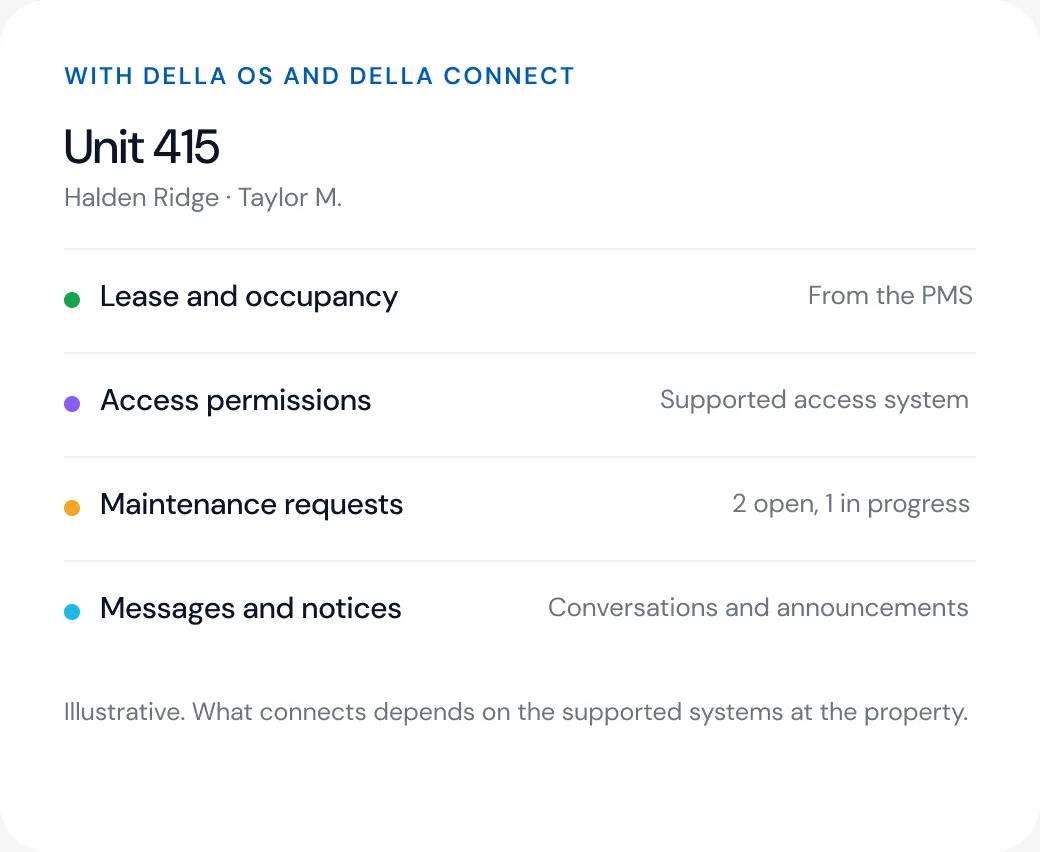
Less coordination between systems. More progress across the property.
Every unnecessary handoff has a cost.
Repeated entries, disconnected portals and missing context consume time throughout the day. Della Connect brings more of that work into one place.
For property teams
Less time gathering information.
Bring the resident, unit and available device information into the work, so staff can respond with better context.
For management
A more consistent daily operation.
Give employees a common place to manage responsibilities and review progress.
For residents
Fewer gaps between the request and the response.
Give residents a clear way to report an issue, communicate with the team and follow its progress.
Management dashboard
Know what needs attention. Have the context to act.
A useful dashboard helps your team decide what to do next.
Start with open requests, unit turnover, occupancy and building conditions in one view. Open any item to see the resident, the unit and the related requests, then assign the work or follow it through.
Your team spends less time reconstructing the situation before they can respond.
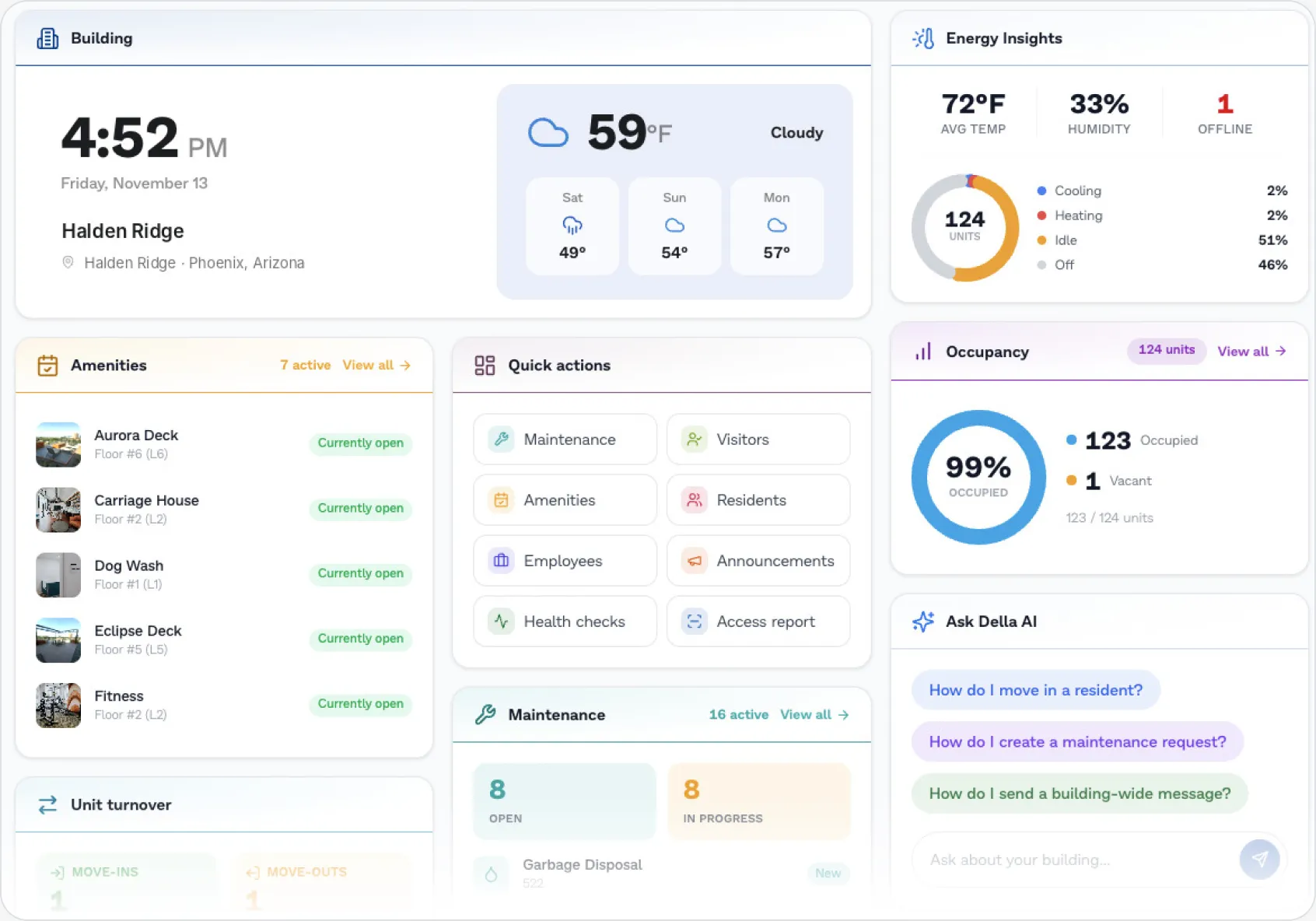
Maintenance
Open and in progress requests, with the newest listed first.
Amenities
Shared spaces and whether each one is open right now.
Quick actions
Shortcuts to the tasks the team handles most.
Occupancy
Occupied and vacant units at the building.
Energy insights
Average temperature and humidity, and how connected thermostats are running.
Real Della Connect dashboard, shown with a demonstration property name. Each building’s dashboard can be arranged around its own widgets, in light or dark mode.
Device health
Know more before you reach the unit.
When a connected device reports an issue, Della Connect can give your team more than a warning. Review the affected unit, the detected condition and the available check history before deciding what to do next.
What was detected
The unit was not reaching its set temperature. Della found this by comparing the room temperature with the thermostat setpoint.
How long it has persisted
Present in every check since it was first detected on Nov 9 at 9:15 PM: 3 days and 19 hours so far.
The history behind it
Seven days of checks, including an earlier episode that recovered.
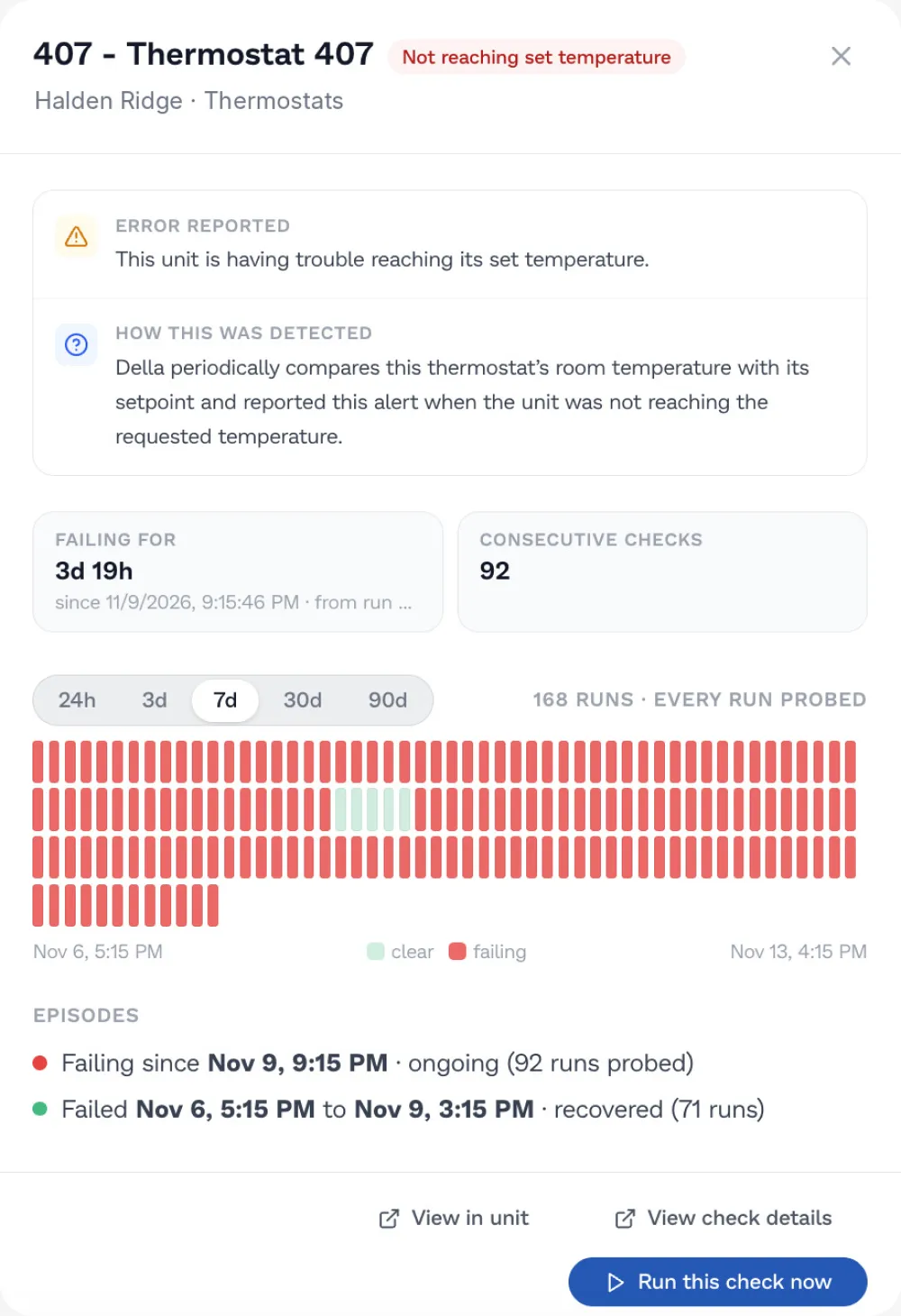
Real Della Connect device check, shown with a demonstration property name.
Della Connect Mobile
The property does not run from behind a desk. Neither should your team.
Property operations happen in suites, corridors, amenity spaces and everywhere between.
Della Connect Mobile keeps your team connected to management functions while they move through the property. Check the building, review warnings, and open a unit and its connected devices while you are on site.
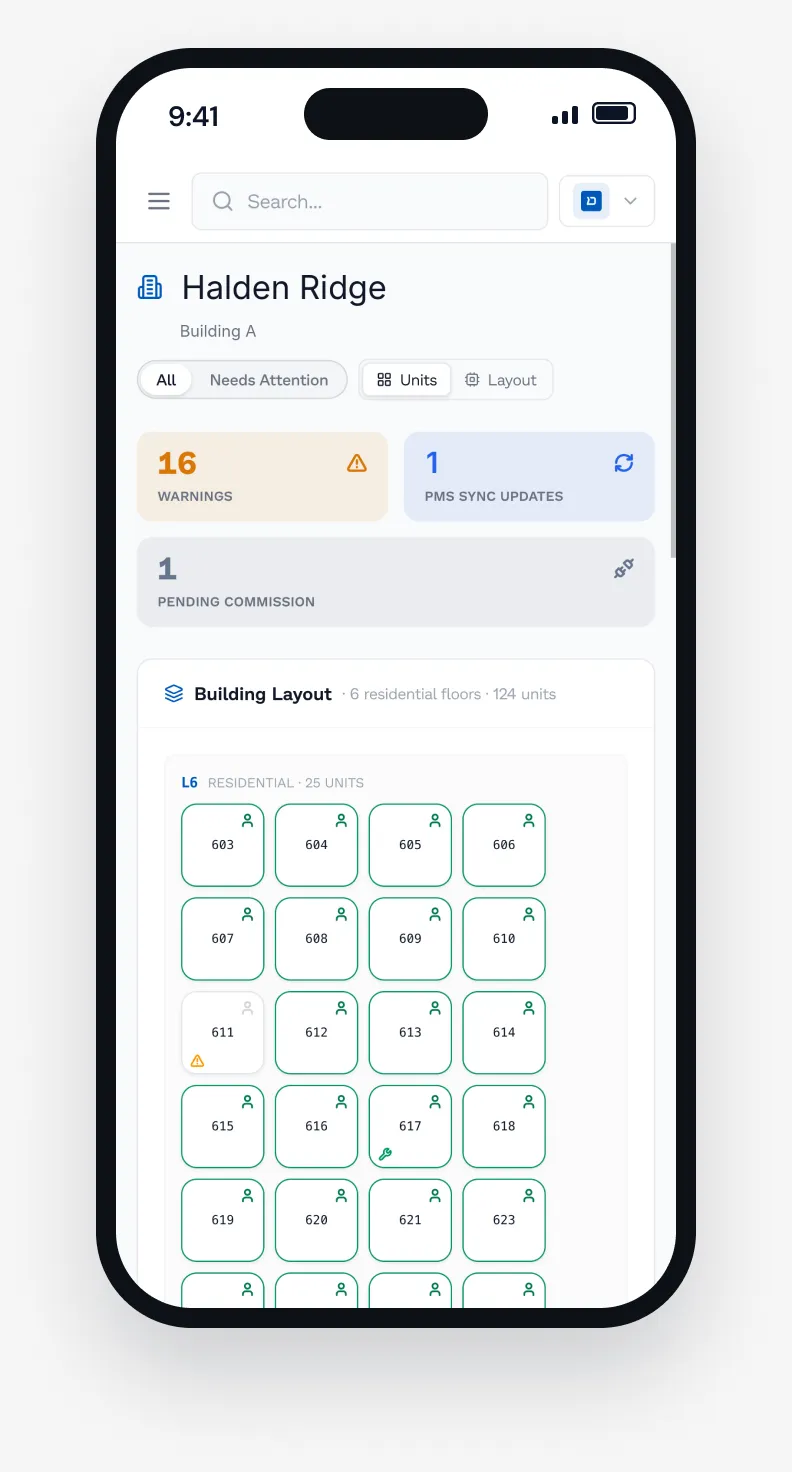
Property overview
Warnings, PMS updates and every floor of the building.
Warnings and conditions
Device warnings grouped by type, with the units affected.
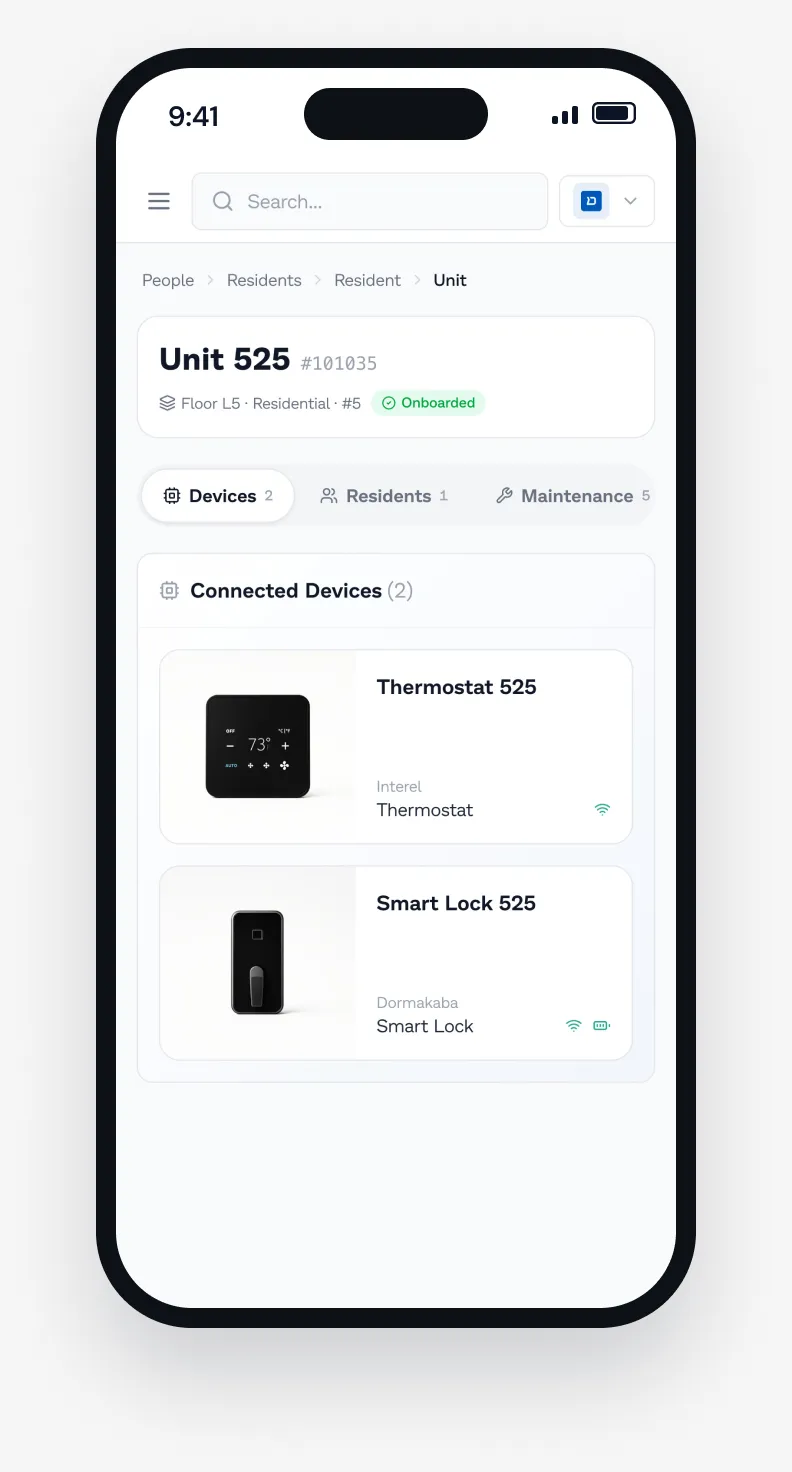
Unit and devices
Open a unit to see its connected devices and their status.
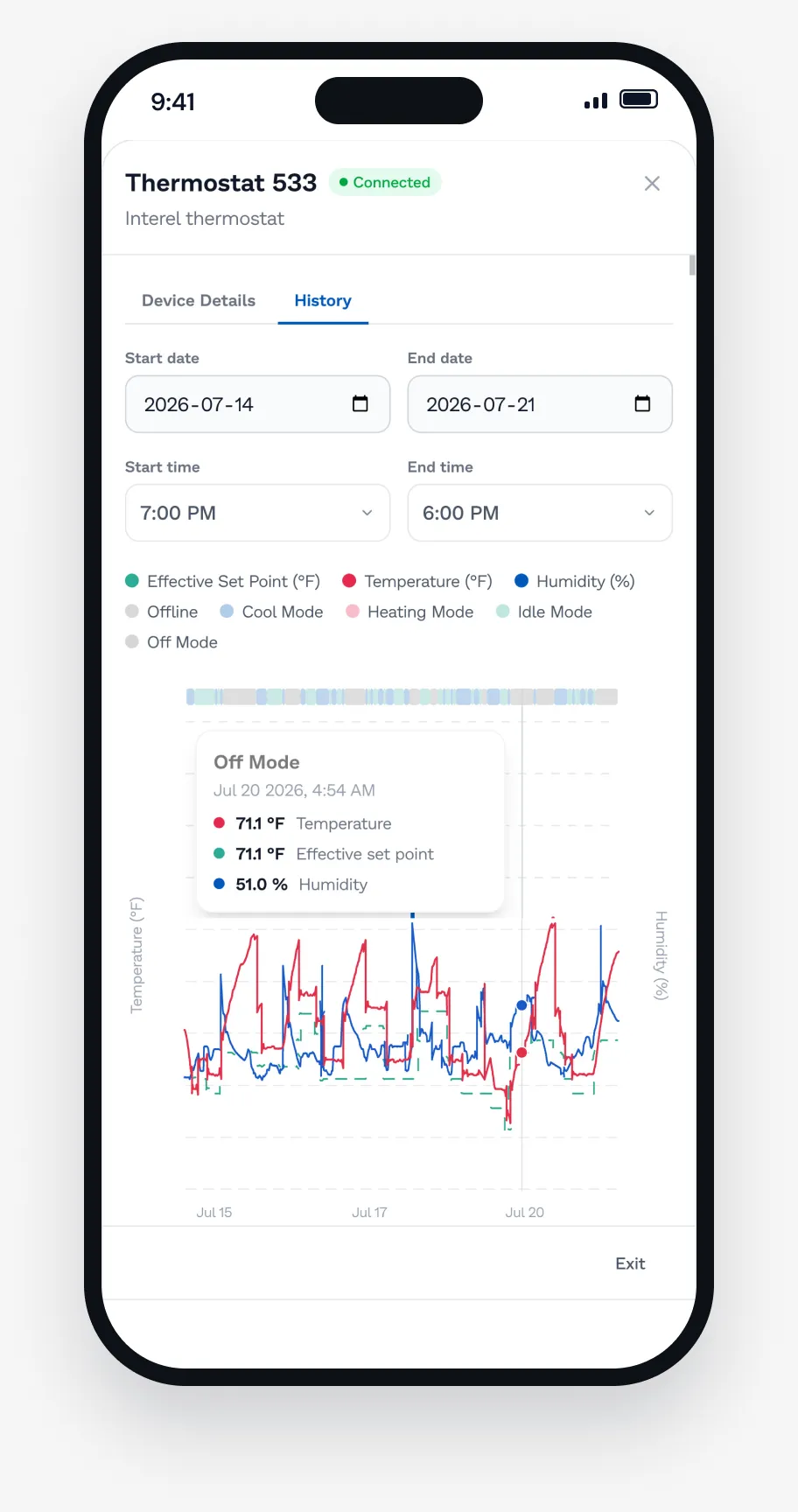
Device history
Open a device. See what it has been doing.
Della Connect Mobile shows a connected thermostat’s recent history, so whoever is checking the unit can see how it has been running before they adjust anything.
Three readings on one timeline
Effective set point, room temperature and humidity, side by side.
Operating mode
When the thermostat was cooling, heating, idle, off or offline.
Exact readings
Tap any moment to see the values at that time.
Set point against room temperature
See whether the room reached what was asked of it, and when it drifted.
Della Connect Mobile screen for an Interel thermostat, with the chart lines thinned for legibility. Available history depends on the device and its integration.
The information your team needs should be available where the work happens.
Real Della Connect Mobile screens, shown with a demonstration property name. Available functions depend on the property’s configuration, connected systems and each employee’s permissions.
Capabilities
The work of running a property, brought together.
Della Connect organizes the management workspace around the work your team does every day.
Open the resident, review the unit and manage the task without rebuilding the context in another system.
Residents and occupancy
Bring resident and unit information into the daily workflow. PMS connections help keep operational information aligned with occupancy changes.
Maintenance and service requests
Manage requests with photos and work orders, and see the unit’s device history. With supported PMS connections, a request created in Della Connect is also created in the PMS.
Access and permissions
Manage access for residents, staff, visitors and contractors according to property rules and assigned permissions.
Communications and documents
Publish announcements, send targeted messages and share property information through a consistent management workspace.
Amenities and community
Manage reservations, events and shared spaces, connecting community activity to the team responsible for operating it.
Connected building systems
Bring devices and building information into Della Connect, with monitoring and controls that depend on the installed equipment and integration.
Team administration
Give authorized employees access to the management functions relevant to their responsibilities.
Residents and occupancy
Real screen · demonstration property name
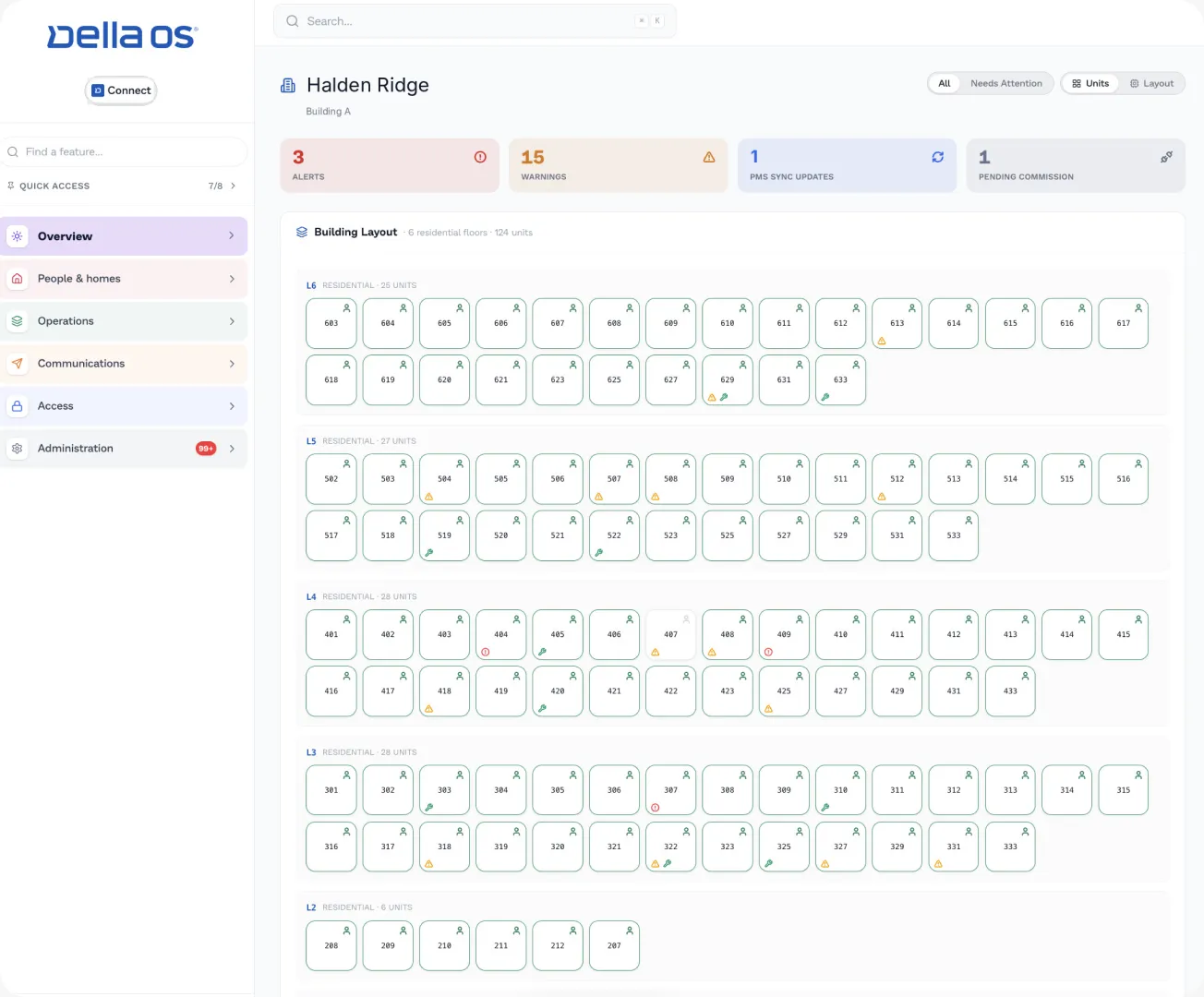
Alerts and warnings
Device issues that need attention, counted for the building
PMS sync updates
Resident and lease changes received from the PMS
Floor by floor units
Occupancy and open items shown on each unit
Available functions depend on the property’s configuration, connected systems and permissions.
Also in Della Connect, where configured
Parking assignments · Visitor records · Unit turnover tracking
In operation
Regius Square, Salt Lake City. Operated by Asset Living.
Asset Living runs this 124 unit community on Della OS, integrated with Yardi. The property team uses Della Connect to run the daily operation across access, climate, intercom and amenity systems.
Read the Regius Square case study →124
units on Della OS, active or contracted, as of November 2026

PMS integration, with resident onboarding
Recognition
Parks Associates 2025 Property Innovation Award
Awarded to Regius Square by Asset Living
What the property team runs on Della OS
Resident onboarding from Yardi
Occupancy based energy controls
A sample of companies Della has worked with across multifamily, student housing and senior living.
Occupancy Sync
Routine changes should not create routine administration.
A resident moving in, transferring or moving out can affect more than a lease record.
Through Occupancy Sync, PMS changes trigger the workflows configured for the property. Della Connect gives your team the workspace around those residents and units, with fewer separate updates to coordinate.
Explore Occupancy Sync →Illustrative configuration
Move in
Your PMS
Move in recorded for Taylor M., Unit 415
Della OS
Occupancy Sync
Runs the workflows configured for this property
Resident account
Della Resident
Access permissions
Supported access system
Unit settings
Supported thermostats
Della Connect
Your team
Sees the unit ready, or an exception to resolve
Transfer
Your PMS
Transfer recorded for Taylor M., Unit 415 to Unit 702
Della OS
Occupancy Sync
Runs the workflows configured for this property
Resident account
Moves to Unit 702
Access permissions
Move to Unit 702
Unit settings
Updated in both units
Della Connect
Your team
Sees both units updated, or an exception to resolve
Move out
Your PMS
Move out recorded for Taylor M., Unit 415
Della OS
Occupancy Sync
Runs the workflows configured for this property
Resident account
Closed for the unit
Access permissions
End on the move out date
Unit settings
Vacant setting applied
Della Connect
Your team
Sees the unit ready to turn, or an exception to resolve
Which workflows run, and when, depends on the PMS, the property’s settings and the connected systems.
Connected work
The value becomes clear when the work crosses systems.
Three everyday tasks, and what changes when the people, the information and the building systems are connected.
Starts
A resident reports a problem with photos, or a device reports a condition.
Your team
Review the request with the unit and device history, then assign a technician.
Della OS
With a supported PMS, the request is also created there. Access for the visit follows property rules.
Less admin
Less retyping between systems, and more context for the technician.
Starts
A resident books the lounge in Della Resident.
Your team
Check the booking against the space’s rules for capacity, guests and terms.
Della OS
The booking follows property rules, and access to the space follows the booking.
Less admin
Fewer manual approvals, and no separate access change to remember.
Starts
A move out is recorded in the PMS.
Your team
Plan the unit turnover from the unit record.
Della OS
Occupancy Sync runs configured updates, such as ending access on the move out date.
Less admin
Fewer offboarding steps repeated across systems.
Illustrative examples.
Roles and permissions
A shared workspace. The right responsibilities.
Property managers, leasing staff and maintenance teams do different work.
Della Connect supports role based permissions, so each authorized employee works with the management functions that fit their responsibilities, inside one shared workspace.
Property manager
Typically works with
Announcements and messages
Leasing
Typically works with
Maintenance
Typically works with
Maintenance requests and work orders
Unit devices and warnings
Della Connect Mobile on site
Example roles. Each property sets up its own roles and permissions in Della Connect.
Roles you define
Properties set up roles, permissions and administrative controls to match how their team works.
Assigned properties
Staff responsible for more than one property can work across the properties assigned to them, where available.
Audit log
Della Connect includes an audit log for authorized administrators.
Della AI
Help that understands the property you are operating.
Della AI brings property context into Della Connect. Ask it for information, or ask it to make a change, and it carries the change through the connected systems that depend on it.
Its value comes from understanding the property, the connected systems and the user’s permissions.
Explore Della AI →The property
Context from the building, units and residents your team manages.
Connected systems
Changes reach the systems that depend on them, such as reservations and access control.
Your permissions
Della AI acts only within the property and the actions your role allows.
Change the fitness center’s Monday hours so it closes at 11:30 PM.
Done. The Fitness Center now closes at 11:30 PM on Mondays. I updated everything that depends on those hours:
Amenity hours
Mondays now close at 11:30 PM
Reservations
Booking times follow the new hours
Access schedule
Door access follows the new hours
Ask about your building or request a change…
Illustrative exchange. Della AI acts within the asking user’s permissions and the property’s connected systems.
Della Connect is the property operations interface inside Della OS. Authorized property staff use it to manage residents, maintenance, communications, access, amenities and building systems from one management workspace, at a desk or with Della Connect Mobile.
Property managers, leasing staff, maintenance teams and other authorized employees. Each person works with the functions their role allows. Staff responsible for more than one property can work across the properties assigned to them, where available.
How does Della Connect relate to Della OS?
+
Della OS is the operating system that connects property software, building systems, people and workflows. Della Connect is the workspace your team uses to run the property on Della OS.
Is Della Connect the resident app?
+
No. Della Connect is for property staff. Residents use Della Resident, which connects to the same property information so requests, bookings and messages reach the team handling them.
What is Della Connect Mobile?
+
It puts what staff need on site, such as building checks, warnings and each unit’s devices, on their phone. What each employee sees depends on the property’s configuration and their permissions.
Does Della Connect replace our PMS?
+
No. Your property management system stays in place. Through Occupancy Sync, resident and occupancy changes flow into Della OS. With supported connections, a maintenance request created in Della Connect is also created in the PMS.
Can Della Connect work with our existing building systems?
+
Often, yes. Della OS connects with supported access control, smart locks, thermostats, intercoms, leak sensors and network systems. What appears in Della Connect depends on the installed equipment and the integration. The integrations page lists what is supported today.
Do we need new smart building hardware?
+
Not to start. Resident management, maintenance, communications and amenities do not depend on in unit hardware. Connected devices add monitoring and control where the equipment and integration support them.
How are employee permissions managed?
+
Della Connect uses role based permissions. Authorized administrators set up roles and assign them to employees, so each person can use the management functions relevant to their responsibilities.
Della Connect walkthrough
See how your team could run the property.
Walk through Della Connect using the tasks your staff handle every day, the PMS you use and the systems already in your building.
Explore the management dashboard and Della Connect Mobile. See how Della Connect fits the work your team needs to get done.